
/
Help center
/
Born2trade X platform

Born2trade X platform

Learn how to use the Born2trade X platform, manage trades, and access its tools and features.

Icon - Elements Webflow Library - BRIX Templates

How can I delete my account?

You can delete your account directly from the platform by following these steps:

  1. Go to the Account tab.
  2. Open User Settings.
  3. Click on the Security tab.
  4. Click the Delete Account button and confirm your request.

Please note that account deletion is permanent and cannot be reversed. Most of your personal data will be removed from our systems. However, certain information may be retained where required for legal, regulatory, or compliance purposes. This data can be removed on demand.
Icon - Elements Webflow Library - BRIX Templates

Can I log in to the Born2trade X app with multiple accounts?

Once you log in, you can create and manage multiple trading accounts under the same profile. The app allows you to switch between accounts without logging out.

Icon - Elements Webflow Library - BRIX Templates

How do I switch between web and mobile versions of Born2trade X?

Use the same credentials across all versions to access your accounts.

Icon - Elements Webflow Library - BRIX Templates

How do I enable one-click trading on Born2trade X?

Enable one-click trading in Account setting > Notifications >  Trading Activities.

Icon - Elements Webflow Library - BRIX Templates

How do I change between light and dark mode on the Born2trade X platform?

Click on the Profile icon and choose your preferred theme from the menu.

Icon - Elements Webflow Library - BRIX Templates

How can I set up price alerts and push notifications in the Born2trade X app?

Go to Settings, enable notifications, and set custom price alerts for your instruments.

Icon - Elements Webflow Library - BRIX Templates

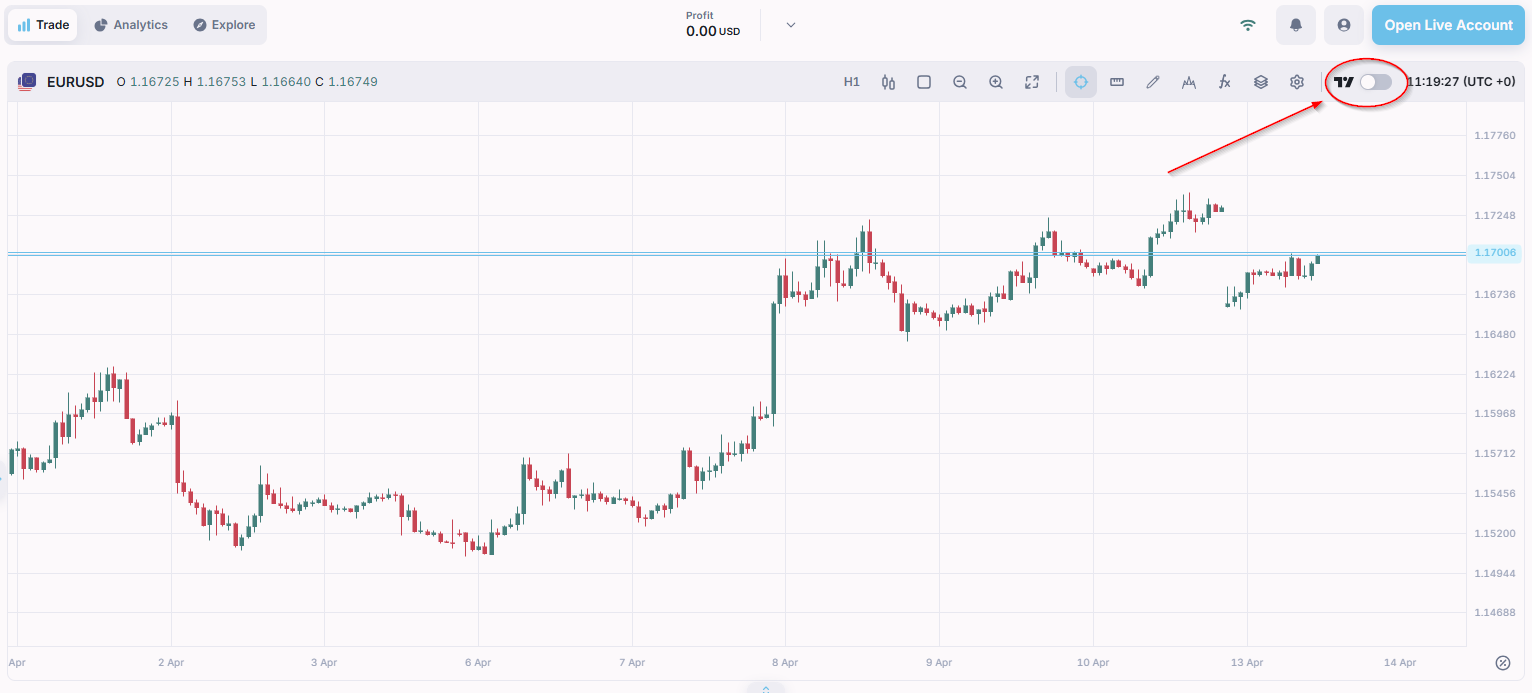
How do I access TradingView charts on Born2trade X?

TradingView charting is integrated into the platform. Open a chart and select "TradingView mode".

How to enable TradingView charts in Born2trade X
Icon - Elements Webflow Library - BRIX Templates

What types of trading indicators are available on Born2trade X?

The platform includes popular indicators such as Moving Averages, RSI, MACD, and others.

Icon - Elements Webflow Library - BRIX Templates

How can I customise my chart settings and indicators on Born2trade X?

Use the menu above the chart to change the chart type or timeframe, add indicators, and adjust indicator settings.

Icon - Elements Webflow Library - BRIX Templates

How do I add or remove symbols from the Born2trade X favourites list?

Tap the star icon next to a symbol to add or remove it from your favourites list.

Icon - Elements Webflow Library - BRIX Templates

How do I view my open positions, order history, and account balance on Born2trade X?

Access your order history and open positions in corresponding tabs under the chart. Your account balance is showed beside your account number in the accounts dropdown.

Icon - Elements Webflow Library - BRIX Templates

How do I place and manage orders using Born2trade X?

Select a symbol, choose order size, and tap "Buy" or "Sell" to place a Market order. Managed your open positions in the corresponding tab under the chart.

Icon - Elements Webflow Library - BRIX Templates

Do I have access to MT5 through Born2trade X?

No. Born2trade X and MT5 are separate platforms. You can choose either depending on your preference.